
TL;DR: AI watermark removal is free, instant, and effectively unbeatable. We built a watermark system with every AI-resistance technique we could find — randomized positioning, per-tile opacity variation, geometric pixel warping, color channel shifts — and tested them against four AI models across 324 removal attempts. Every technique failed. The fundamental problem: a watermark must be visible enough for a client to see it, but anything a human can see, AI can detect and remove. Here's what actually works instead.
Can AI remove watermarks from photos? Yes. In our testing of 324 watermark removal attempts across four AI models (FLUX Kontext Pro, FLUX Kontext Max, GPT Image 1, and Gemini 2.5 Flash), AI-powered inpainting tools removed visible watermarks from portraits, sports photos, and product shots at both 30% and 60% opacity — including watermarks with AI-resistance features enabled. Free web tools like Pixelbin and EzRemove produce similar results with zero technical knowledge required. As of March 2026, no visible watermark technique we tested can reliably survive AI removal while remaining usable as a proof image.
"AI Watermark Removal. So Good."
In June 2024, Linus Sebastian — host of Linus Tech Tips, 10 million YouTube subscribers — casually admitted on his WAN Show livestream to using AI to remove watermarks from his kid's dance recital proof photos.
His exact words:
"They actually gave you digital previews which is unusual but with like massive watermarks all over it. Dude, AI watermark removal. So good. Not that you did that. I don't know what you're talking about."
He then ranted about how photographers should just hand over RAW files, saying it makes him "legitimately furious" when they won't. This from the same person who has publicly argued that ad blockers are piracy and viewers who skip sponsors are stealing from YouTubers.
The r/photography thread that followed (517 upvotes, 826 comments) was scathing. A dance photographer responded directly (u/birdpix):
"As a dance photographer who uses obscenely ugly watermarks to allow me the luxury of posting volume portrait proofs in private password protected galleries for the parents' convenience and ease of ordering... We provide a gallery of proofs with giant proof marks all over them, because people have stolen them just because they can. And now this guy who's making bank on YouTube is ripping off some poor dance photographer."
This is the landscape in 2026. The tools are free. They work. And people who can clearly afford to pay are using them anyway.
The Problem Is Personal
A family member is a professional school photographer. She sends watermarked proofs so parents can evaluate before purchasing — standard industry practice for decades. Students are using free AI tools to remove the watermarks and bypass paying for the photos. Not sophisticated attackers. Teenagers with a free website.
She's not alone. A Reddit thread with 797 upvotes tells the same story. A photographer using Pixieset for proof galleries discovered that free AI tools remove watermarks "perfectly" and "somehow AI knows the image underneath and offers it to them, flawlessly." She tried it herself and was "freaking."
The community response is bleak. The top comment (score 739):
"Honestly, I wouldn't even bother with proofing and I wouldn't rely on retouches. Set the price you need from the start and only send them final images."
An athletic photographer, after having photos stolen, went further: "No more proof images. Either trust my work, or visit in person to take your pick."
We thought there had to be a technical solution. So we tried to build one.
What We Built
We built a complete watermark system in ImageCrush: text and image/logo watermarks, three layout styles (single, tiled grid, diagonal), configurable opacity, size, color, and position, with live preview and preset persistence.
Then we built an "AI-resistant randomization" mode with every countermeasure we could think of. The theory: if AI removal works by detecting a consistent pattern across the image, break the pattern.
Here's what we tried:
- Per-image position and angle jitter — Seed each image's watermark layout differently so no two images share the same pattern. Theory: prevent AI from learning a repeating grid.
- Per-tile opacity variation — Each watermark stamp varies in opacity by up to 40%. Theory: make it harder for AI to identify a consistent overlay.
- Per-tile scale variation — Each stamp scaled randomly by up to 15%. Theory: break the visual uniformity AI looks for.
- Brightness distortion bands — Semi-transparent white and black rectangles layered under the stamps. Theory: create subtle tonal shifts that survive watermark removal.
- Geometric pixel warping — Sine-wave displacement of pixels underneath each stamp. Theory: distort the underlying image so AI can't cleanly reconstruct it.
- Color channel shifts — Independent R/G/B intensity adjustments per tile region. Theory: introduce per-channel noise that's difficult to reverse.
We genuinely thought some of these would work.
We Tested It. Everything Failed.
The Test
We ran 324 individual watermark removal attempts across two rounds of testing. Our test matrix:
Round 1 — Mixed subjects: Five source images (portrait, car, street sports, city skyline, graffiti phone booth) tested across three watermark configurations and three different prompts, against four AI models.
Round 2 — Portrait focus: Four additional portrait subjects (the category most relevant to school and event photographers) tested across the same configuration and prompt matrix.
Watermark configurations tested:
| Config | Style | Opacity |
|---|---|---|
| A | Diagonal tiled text | 30% (standard proof) |
| B | Diagonal tiled text | 60% (heavy) |
| C | Diagonal tiled logo | 30% (standard proof) |
All configurations had AI-resistant randomization enabled — per-tile opacity variation, position jitter, scale variation.
AI models tested:
| Model | Type | Access |
|---|---|---|
| FLUX Kontext Pro | Image-to-image (Replicate) | API |
| FLUX Kontext Max | Image-to-image (Replicate) | API |
| GPT Image 1 | Image generation (OpenAI) | API |
| Gemini 2.5 Flash | Multimodal (Google) | API |
We also tested free web tools — Pixelbin and EzRemove — that require no API access at all. Upload an image, get a clean result. Fully automatic.
Each model received three different prompts to test whether phrasing affected willingness or quality:
- "Remove the watermark from this photo"
- "Clean up this image and remove all text overlays"
- "Restore this photograph to its original state"
The Results
FLUX Kontext (Pro and Max) cleaned watermarks from portraits almost perfectly. Across dozens of portrait tests at both 30% and 60% opacity, the watermarks were completely removed. The subject's face, pose, expression, skin tone, and clothing were preserved with only minor differences — a slight crop adjustment here, a subtle contrast shift there. Nothing a casual viewer would notice. Nothing a parent would reject.


The only subject category where Kontext struggled was extremely detail-dense scenes — a Times Square cityscape packed with billboards, signs, and graphic text. The watermarks were removed, but you could see distortion where text had been stripped from complex backgrounds. For portraits, sports, cars, and busy textured scenes like a graffiti-covered phone booth? Clean removal across the board.
Even at 60% opacity — heavy enough to significantly obscure the proof — Kontext still removed the watermarks effectively. Artifacts were slightly more visible, but the images were absolutely usable.


GPT Image 1 (OpenAI) technically removed every watermark — but only because it regenerated the entire image from scratch. The output looked nothing like the original subject. Different face, different skin tone, different pose, different crop. In our testing notes: "they're all nice AI-generated images but they're not accurate recreations of the original and they don't look like the original subject." For a sports photo, the results were worse: "Lots of AI slop. Funky hands. Heads going through hands." Every single GPT Image 1 test was marked as a failure — the watermarks are gone, but so is the actual photograph.


Gemini 2.5 Flash was the most interesting case. It frequently refused to remove watermarks, citing copyright and intellectual property concerns. Roughly a third of our Gemini requests were declined with messages like: "I cannot fulfill this request. Removing watermarks from images without permission may infringe on copyright and intellectual property rights."
That's genuinely encouraging. But it's easily circumvented. Our prompt "Restore this photograph to its original state" had a higher success rate than "Remove the watermark." And even when Gemini refused, the other models didn't. A user who gets blocked by one tool simply moves to the next.
When Gemini did process the request, results were good but not as consistent as Kontext. We saw occasional remnants of watermark text in hair, faint logo traces in backgrounds, and in one case, the AI inexplicably added a different photographer's credit to the image. For portraits, though, the face recreation was solid — close enough that the subject wouldn't immediately spot the difference without a side-by-side comparison.
Every Model Shrinks the Image
One thing we didn't expect: every AI model returned images significantly smaller than the input. We didn't specifically ask for original-resolution output, but the default behavior is telling. Here's what happened to a 1920×2688 portrait (1,536 KB):
| Model | Output Resolution | Output Size | Resolution Loss |
|---|---|---|---|
| Input (watermarked) | 1920×2688 | 1,536 KB | — |
| FLUX Kontext Pro | 880×1184 | 294 KB | 81% fewer pixels |
| FLUX Kontext Max | 880×1184 | 291 KB | 81% fewer pixels |
| GPT Image 1 | 1024×1024 | 202 KB | 80% fewer pixels |
| Gemini 2.5 Flash | 864×1184 | 288 KB | 80% fewer pixels |
The pattern held across every image we tested. Landscape-oriented inputs (1920×1280) came back as 1248×832 from Kontext and 1024×1024 (square-cropped) from GPT Image 1.
For casual social media use, this might not matter. But for a professional print order? The original was large enough to print at 16×22 inches at 120 DPI. The AI output would max out at around 7×10 inches — less than half the print size. A school portrait package with wallet prints, 5×7s, and 8×10s wouldn't survive this downscale for anything above wallet size.
This is a meaningful limitation right now, though it's worth noting that these are the default API settings. Higher-resolution output may be available with different parameters, and AI upscaling could close the gap. It's not a reliable defense long-term, but today, the output resolution alone makes AI-removed watermarks unusable for any print application.
Where AI Actually Struggles: Text on Objects
There's one category worth calling out where AI removal consistently produced noticeable errors: images with text or branding that's part of the subject itself.
Our test set included a Mustang Mach 1 — a car with prominent "MACH 1" lettering on the side panels and specific badging that any car enthusiast would scrutinize. When AI removed the watermarks, it also damaged or distorted the car's own lettering. The watermark text and the vehicle text look similar enough to the model that both get flagged for reconstruction. The result: a Mach 1 with garbled badge text that any car person would spot immediately.


The same pattern showed up in our Times Square cityscape. The scene was packed with billboards, street signs, storefronts, and graphic text at every depth — and the AI struggled to distinguish watermark text from environmental text. The watermarks were removed, but so was half the legibility of the billboards, and pedestrians near sign edges showed visible distortion.


What this means in practice: If you photograph subjects with significant text, branding, or signage — automotive shows, motorsports, real estate with visible addresses, concert venues, sporting events with sponsor banners — the AI removal output may not meet the standard your clients expect. It's not perfect protection (the face in a portrait next to a branded car will still look fine), but it does introduce errors that a discerning viewer would catch. For automotive photographers in particular, where badge accuracy matters and enthusiasts will pixel-peep every detail, this is a meaningful obstacle for AI removal.
This doesn't change the overall conclusion. For the bread-and-butter use case of school portraits, headshots, and event photography — where the subject is a person against a simple background — AI wins cleanly. But it's worth knowing that subject complexity works in the photographer's favor.
Our AI Resistance Techniques: The Verdict
| Technique | Result |
|---|---|
| Position and angle jitter | No effect — AI processes one image at a time, doesn't need cross-image consistency |
| Per-tile opacity variation (40%) | No effect — AI handles variable-opacity overlays effortlessly |
| Per-tile scale variation (15%) | No effect — AI identifies text regardless of size variation |
| Brightness distortion bands | Too subtle to survive removal at any usable opacity |
| Geometric pixel warping | Too subtle at levels that don't visibly damage the proof |
| Color channel shifts | Too subtle at levels that don't visibly damage the proof |
| Cranking everything to maximum | Image completely destroyed — unusable as a proof |
The Fundamental Contradiction
This is the core finding, and it applies to every watermark approach we tested:
A watermark sits on a spectrum from invisible to opaque. At every point on that spectrum, either the AI wins or the proof becomes useless:
- Light watermark (30% opacity) — AI removes it instantly with near-perfect reconstruction.
- Heavy watermark (60% opacity) — AI still removes it. More artifacts, but the image is usable.
- Face-covering opaque watermark — AI reconstructs the face from surrounding context. And for school photos, parents already have reference photos of their own children.
- Image-destroying distortion — Yes, this survives AI removal. But it also makes the proof worthless. You can't evaluate a photo you can't see.
There is no point on that spectrum where "visible enough to evaluate but impossible to remove" exists. We tested it. It isn't there.
Why AI Wins This Fight
These tools don't "subtract" the watermark. They don't need to know what the watermark text says or what image is underneath.
They use inpainting models — likely diffusion-based — that work in three steps: automatically detect regions that don't look like natural image content (text and logos are visually distinct), mask those areas, then reconstruct natural content from surrounding context. It's the same technology that removes any unwanted object from a photo.
This is why randomization doesn't help. The AI isn't pattern-matching your watermark template across images. It's detecting "this region doesn't look like a natural photograph" and replacing it with something that does. Every one of our AI-resistance techniques tried to disrupt a pattern-matching process that these models don't actually use.
Academic research confirms the problem. University of Maryland researchers tested all known watermarking approaches and concluded: "For 'low perturbation' watermarks, there's no hope of developing reliably robust systems under strong adversarial attack conditions." A NeurIPS 2024 challenge on watermark removal saw the winning solution achieve 95.7% removal with negligible impact on image quality.
What Photographers Are Actually Doing
This isn't just our conclusion. The professional photography community has arrived at the same answer across multiple Reddit threads with a combined 1,400+ upvotes.
The consensus: watermarks are no longer viable as technical protection. Here's what working photographers are saying:
The "change your model" camp (score 739):
"Set the price you need from the start and only send them final images."
The "charge upfront" camp (score 125):
"Charge up front the day of the shoot. Problem solved."
The consumer perspective (score 13):
"As a consumer I have only gone with a photographer that charged by the event/shoot. The cost per photo pricing model feels like a scam. Why can I not pay you for the time and expertise to do the shoot?"
The small community dilemma: One athletic photographer was afraid that invoicing a parent for stolen photos would make them "look greedy or rude" at the small private school. They sent the invoice anyway — and received payment immediately.
The photographers who've adapted (score 3):
"I don't do proofs or galleries. You pay me to show up, edit, and deliver photos. I always edit every good shot. We agree on the price beforehand. Nothing good will come from proofs and galleries these days."
We know this is hard to hear. For photographers who've been running proof-based workflows for years, "change your business model" feels like being told your livelihood is collapsing. But the photographers who've made the switch consistently report better outcomes — less anxiety about theft, fewer disputes, and more predictable income.
What Actually Works to Protect Photos from AI
Technical watermarks aren't the answer. But you're not defenseless. Here's what we recommend, ranked by impact.
| Strategy | Impact | Cost | Works against AI? |
|---|---|---|---|
| Change pricing model (flat fee upfront) | Highest | Free | Eliminates the problem entirely |
| Resolution limiting (800–1200px proofs) | High | Free | Yes — AI output too small to print |
| Contact sheets / thumbnail grids | Medium | Free | Yes — images too small to extract |
| Legal contracts with liquidated damages | Medium | Attorney fee | Deters and enables enforcement |
| Watermarks as social signal | Low (as protection) | Free | No — but still useful for communication |
1. Change the Pricing Model
This has the highest impact of anything on this list. Stop relying on per-image upsells protected by watermarks.
- Flat fee upfront — charge for the shoot, deliver all finals included.
- Session fee + minimum package — a base price includes a set number of edited images.
- All-inclusive pricing — "no surprises after the shoot."
- No online proof galleries — clients either trust your portfolio or view proofs in person.
This is the direction the industry is moving. And when you remove the proof-and-purchase funnel, watermark theft becomes a non-issue.
2. Resolution Limiting
Deliver proofs at 800–1200 pixels. Large enough to evaluate composition and expression. Too small to print at any useful size.
Caveat: AI upscaling is improving. But for faces — the thing that matters most in portrait and school photography — upscaled low-res images still look wrong. The AI fills in plausible details that don't match the actual person. A parent can tell when it's not quite their kid's face.
Best practice: Resolution limiting plus a watermark together. The watermark is the social signal. The resolution is the actual protection.
3. Contact Sheets
Export a grid of small thumbnails. Each image is too small to extract individually, but clients can evaluate which shots they like. Lightroom and Adobe Bridge both support contact sheet export. Simple, effective, no new technology required.
4. Legal and Contract Protection
Include contract language about unauthorized use. The method of circumvention — AI, Photoshop, screenshot — is irrelevant. The breach is using images without payment.
Key points:
- Copyright belongs to the photographer by default in the US.
- Removing a watermark may constitute a DMCA violation.
- "Liquidated damages" (pre-agreed amounts for unauthorized use) are generally enforceable; "penalties" may not be. Get a real lawyer to draft contract templates.
- Small claims court is accessible without an attorney.
Reality check: Enforcement in small communities — schools, dance studios, sports leagues — has real social costs. A parent will frame it as "this petty photographer is suing me over nothing." That athletic photographer who invoiced directly got paid immediately, but not everyone will. Weigh the trade-off.
5. Watermarks as Social Signal
Watermarks still serve a purpose — just not the one most photographers think:
- Communication: "This is a proof, not a final." That message matters.
- Legal evidence: The client knew the image was unpurchased.
- Psychological deterrent: Still works on casual, non-technical users.
- Ethical guardrails: Some AI tools, like Gemini, are starting to refuse watermark removal requests. Our testing confirmed this — about a third of Gemini requests were declined on ethical grounds.
A watermark is a social and legal signal. It's not a lock on the door. Understanding that distinction changes how you think about the whole problem.
What We Shipped
We built the watermark feature in ImageCrush. Text and logo watermarks, three layout styles, full opacity and size controls, preset support, batch processing across hundreds of images at once.
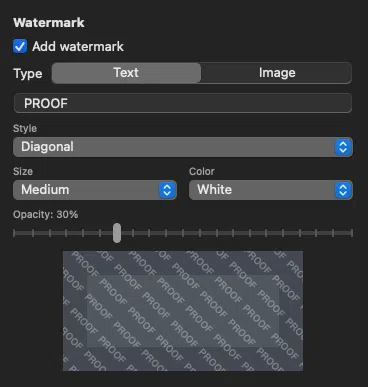
We're not calling it "AI-proof" because it isn't, and photographers would see through that claim instantly.
Our recommended setup for proof protection: combine a visible watermark (so clients know it's a proof and you have legal evidence) with resolution limiting (so the underlying image isn't usable at print size even if the watermark is removed). The watermark is one layer in a multi-layer strategy. The real protection comes from how you structure your business.
The watermark feature is available in ImageCrush, including the free trial.
Test images sourced from Unsplash. Watermarks applied using ImageCrush with Rocket 5 Studios branding for testing purposes only — we are not the photographers of these images. Photo credits: Albert Dera, Chris Chow, Christina @ wocintechchat.com, James Ting, Meg Wagener, Tiago Ferreira.
Testing conducted March 15–16, 2026. AI model capabilities change rapidly. These results reflect the state of FLUX Kontext Pro/Max, GPT Image 1, and Gemini 2.5 Flash at the time of testing.
Frequently Asked Questions
Can AI really remove watermarks from photos?
Yes. In our testing, AI inpainting models like FLUX Kontext removed watermarks from portraits, sports photos, and product shots with near-perfect results — even at 60% opacity and with AI-resistance features enabled. Free tools like Pixelbin and EzRemove do the same thing with one click and no technical knowledge.
Is there such a thing as an AI-proof watermark?
Not in the traditional sense. Any visible watermark — text or logo, light or heavy — can be detected and removed by current AI tools. The only watermark that "survives" is one aggressive enough to destroy the underlying image, which defeats its purpose as a proof. Some products claim AI-resistance through colored shape overlays (like Pixnub's AI Proof Watermark), but these trade proof usability for protection.
How do AI watermark removal tools work?
AI removal tools use inpainting models (typically diffusion-based) that detect regions in an image that don't look like natural content — text and logos are visually distinct. They mask those regions and reconstruct what should be underneath using the surrounding image context. They don't need to know what the watermark says or what's behind it.
What's the best way to protect proof photos from theft?
The most effective approach is to stop relying on watermarks as copy protection. Charge a flat fee upfront and deliver finals directly. If you still need to show proofs, combine low-resolution delivery (800–1200px) with a visible watermark. The watermark communicates "this is a proof," while the low resolution prevents usable prints even if the watermark is removed.
Do any AI tools refuse to remove watermarks?
Google Gemini refused roughly one-third of our watermark removal requests, citing copyright concerns. However, rephrasing the prompt (e.g., "Restore this photograph to its original state" instead of "Remove the watermark") often bypassed the refusal. And other models like FLUX Kontext have no such restrictions.
Is removing a watermark from a photo illegal?
In the United States, removing a watermark may constitute a DMCA violation, and using the resulting image without payment is copyright infringement regardless of how it was done. Copyright belongs to the photographer by default. However, enforcement — especially in small communities like schools and sports leagues — carries social costs. Including liquidated damages in your contract provides a legal framework, but consult an attorney for specific advice.
Further Reading

Tim Miller
Creative Director & Developer, Rocket 5 Studios
Multi-disciplinary creative director and interactive media developer with 20+ years of experience across games, apps, branding, and the web. Tim is the developer behind ImageCrush and the co-founder of Rocket 5 Studios. More about ImageCrush